


What’s New in Qlik Cloud
– July 2026 Updates –
Welcome to the next edition of the ‘What’s New in Qlik Cloud’ blog for July 2026!
Authors: Roger Gray, BI Manager & Tom Cotterill, BI Consultant, at Climber.
Agentic data engineering capabilities across the whole platform
This edition looks a little different from our usual format. Alongside the regular round-up of analytics and data integration updates, the June 2026 release saw one of the most significant announcements in Qlik Cloud’s roadmap to date: the general availability of agentic data engineering capabilities across the entire platform.
Rather than sitting within a single product area, this release touches both Qlik Talend Cloud and Qlik Cloud Analytics, embedding AI agents throughout the data engineering workflow – from discovering trusted assets through to shaping governed, AI-ready data products. Because of its platform-wide scope, we’ve given it its own dedicated section below, ahead of our usual Data Analytics round-up.
1. Agentic data engineering capabilities
Qlik has moved its agentic data engineering capabilities into general availability across Qlik Cloud. Rather than limiting AI assistance to pipeline code generation, Qlik now embeds purpose-built agents throughout the data engineering workflow – helping teams find trusted assets, define business meaning, assess quality, and package governed data products. All while keeping humans in control of the decisions that matter.
The aim is to close the gap between AI ambition and data readiness: for AI agents and analytics teams to work reliably, they need timely data, consistent meaning, quality signals, lineage, and policy controls in place.
- Data Quality: Agents retrieve trust scores and quality metrics, create or edit data quality rules, define service-level objectives, run calculations, and detect or report anomalies via natural language or MCP-enabled workflows.
- Data Products: Helps teams create, manage, and govern trusted, AI-ready data products for reuse across analytics and AI use cases.
- Catalog Glossary: Helps users discover data assets, standardise terminology, and connect business definitions to governed metadata.
- Declarative Pipelines with Coding: Lets data engineers use approved third-party coding agents and dev environments to generate and modify pipelines with governed pipeline context.
- Expanded MCP-enabled data tools: Gives authorised AI clients access to Qlik capabilities and context, so teams can use their preferred AI assistants without losing enterprise control.
2. Agentic tools for Qlik Predict now available in Qlik Answers
Qlik Predict now lives inside Qlik Answers, letting users describe a business problem in plain language – “predict customer churn from this dataset” – and receive a trained model, deployed predictions, or plain-English insights in return, covering both regression and classification problems. For existing Predict users this removes much of the manual experiment-configuration overhead; for everyone else, it puts predictive modelling within reach without a data science background.
3. Review agentic conversations in the Answers review portal
A new tenant-wide Answers review portal lets teams review conversations and feedback across Qlik Answers’ agentic experiences – assistants, applications, and the help specialist – from a single location. Access requires a custom role with the Agentic AI > Review agent and chat interactions permission enabled.
4. Actions in Qlik Answers via Qlik Automate
Qlik Answers can now trigger Qlik Automate automations directly from agentic insights drawn from structured and unstructured data. For example, updating CRM tickets from knowledge articles or pulling additional detail on ongoing incidents. Teams can build their own automation flows tailored to their agents’ needs.
5. AI-generated automation descriptions
A new AI Generate button in Automation settings produces a description of an automation based on its workspace structure, making automations easier to discover for both people and AI agents and MCP integrations. Requires the catalogGovernanceGenAI entitlement.
Data Analytics
On the visualisation side, straight tables and pivots both gained finer styling control. Reporting, mobile governance, Parquet data quality, and Scheduler orchestration all saw incremental but practical improvements. Administrators managing the Qlik Analytics mobile app should review the MAM toggle change to ensure continuity of their governance configuration.
1. Select an existing change store for your Write Table
Write Table charts can now reuse and switch between existing change stores directly from the chart configuration, rather than requiring a fragile one-to-one connection:
- Removes a common blocker when promoting Write Table apps from dev/test into production
- Reduces the risk of lost work if a change store connection breaks
- Gives teams visibility of change store usage across a space, with the ability to name stores for clarity
- Makes write-back configurations easier to manage, reuse, and recreate with matching primary keys
2. Copy and save monitored charts as images
Monitored charts can now be copied to the clipboard or saved as PNG images directly from the activity center, making it easier to share snapshots in emails, presentations, or collaboration tools without recipients needing Qlik Cloud access.
3. Performance Evaluation: Recommendations panel
The Performance Evaluation tool gains a new Recommendations panel, adding actionable guidance alongside existing diagnostics. Phase 1 includes:
- Unused fields: Flags unreferenced data model fields as removal candidates
- Open app phase breakdown: Shows time spent in each phase of app opening, to pinpoint latency
- App design recommendations: Including calculation condition suggestions, sheet and object count guidance, and long title recommendations
Further recommendation categories are planned for future releases, worth revisiting as this feature matures.
4. Subtotals in the new straight table
The new straight table now supports subtotals, making it straightforward to add partial sums without complex expressions. Subtotal styling – font family, size, style, colour and background – can be set independently, in the same way as grand totals.
5. Header and content cell styling in the new Pivot table
Background and text colour for header and content cells in the new Pivot object can now be styled separately, giving more control over visual hierarchy.
6. Paste to create Image and Text objects
Copying an image and pasting it onto a sheet now automatically uploads it to the media library and creates an Image object. Pasting plain text creates a Text object, preserving most formatting, including links. A small but handy shortcut when assembling content.
7. Summarise indexed files in Qlik Answers knowledge bases
Assistants can now list available files and generate summaries on request – for example, “What files are available?”, “Give me an overview of <filename>”, or “Summarise <filename>” – with a choice of overview or detailed, citation-backed summaries, one file at a time.
8. Data quality computation for Parquet datasets
Qlik Cloud now supports quality computation for Parquet datasets registered in the Catalog. Users can compute the Qlik Trust Score™, apply validation rules, and assign semantic types, bringing Parquet in line with the experience already available for other supported dataset types.
Note: This currently covers flat file-based Parquet datasets only, using pull-up processing. Push-down processing is not yet supported.
9. Updated data table experience in Qlik Predict
The Predict data table has been refreshed with improved controls and greater transparency into data preparation. Schema and Data views now include a feature-treatment column, updated checkbox behaviour, and visibility of child engineered features directly in the Data view, making it easier to understand exactly what the model sees.
10. Object filters in reporting
Report developers can now apply filters at the object level, giving finer control over how business reports are presented.
11. New certifications for Qlik Cloud
Qlik has achieved two further certifications underpinning trust in the platform:
- ISO/IEC 42001:2023 – the international standard for AI management systems
- German C5:2020 Type 2
12. Qlik Cloud expands to Canada
A new Canadian cloud region is now available, allowing Canadian organisations to store and process analytics data locally for improved performance and regulatory compliance across sectors including finance, banking, public sector, and healthcare. The Qlik Answers agentic experience is also available in this region.
13. Script: new Exit Error statement
A new Exit Error statement allows script execution to be ended with a user-defined error. Unlike Exit Script, it marks the reload as failed and surfaces the error message in the reload response. This is useful for building more robust, self-documenting error handling into load scripts.
14. Enhanced workflow chaining in Scheduler
The new Scheduler component gains more advanced workflow chaining options, including flows where downstream tasks can continue regardless of whether upstream tasks succeed or fail. This reduces workflow complexity and supports more resilient orchestration patterns for enterprise-scale scheduling.
15. JSON editor for automation blocks
JSON body fields in the Qlik Automate editor now include a syntax helper and a beautify button, instantly reformatting JSON into clean, indented output. Validation errors are surfaced directly below the field, showing what’s wrong and where, so issues can be caught before running an automation.
16. Qlik Analytics mobile app: governance and Intune integration improvements
Tenant administrators can now use mobile scopes to manage user adoption of the Qlik Analytics mobile app, hardening Microsoft Intune integration via server-side control for MAM (Mobile Application Management) deployment.
Action may be required: This update removes the previous user-controlled MAM toggle. Administrators relying on the original toggle-based configuration should review their mobile governance setup following this change.
Data Integration
July brings us a strong mix of forward-looking and practical updates to Qlik Talend Data Integration. Alongside the broader spotlight on Agentic Data Engineering, this month introduces declarative pipelines, expands the Open Lakehouse story for Replicate customers, and adds a few useful governance and monitoring enhancements that make the platform easier to work with day to day.
1. Spotlight: Agentic Data Engineering is now generally available
Qlik has announced the general availability of Agentic Data Engineering across Qlik Talend Cloud and Qlik Cloud Analytics, bringing a broader set of AI-assisted features into production for teams building trusted data for analytics and AI.
Rather than focusing on code generation alone, Qlik is positioning Agentic Data Engineering around governed assistance across the full data workflow. The release brings together several capabilities, including:
- Data Quality for retrieving trust scores, defining and refining quality rules, and working with quality metrics through natural language or MCP-enabled workflows
- Data Products for creating and governing curated, AI-ready datasets
- Catalog Glossary for finding assets, standardising terminology, and connecting business meaning to governed metadata
- Declarative Pipelines with Coding for generating and modifying pipelines using approved third-party AI coding assistants and governed pipeline context
- Expanded MCP-enabled data tools to let authorised AI clients access Qlik capabilities while preserving governance and control
So how would this play out in the real world? A simple example might be preparing a customer or product dataset for AI use. Rather than stitching everything together manually, teams can use agentic capabilities to:
- Find the right governed assets
- Assess quality
- Package it as a trusted data product
- Update the supporting pipeline with AI assistance
All of this can be done all while keeping lineage and control intact.
From a data integration point of view, the most relevant thread is that Qlik is trying to bring AI assistance into governed engineering workflows, not bolt it on as an afterthought. The emphasis throughout is on maintaining lineage, transparency, and control while accelerating the creation of trusted data products for analytics, automation, and AI use cases.
2. Declarative pipelines for Qlik Talend Cloud Pipelines
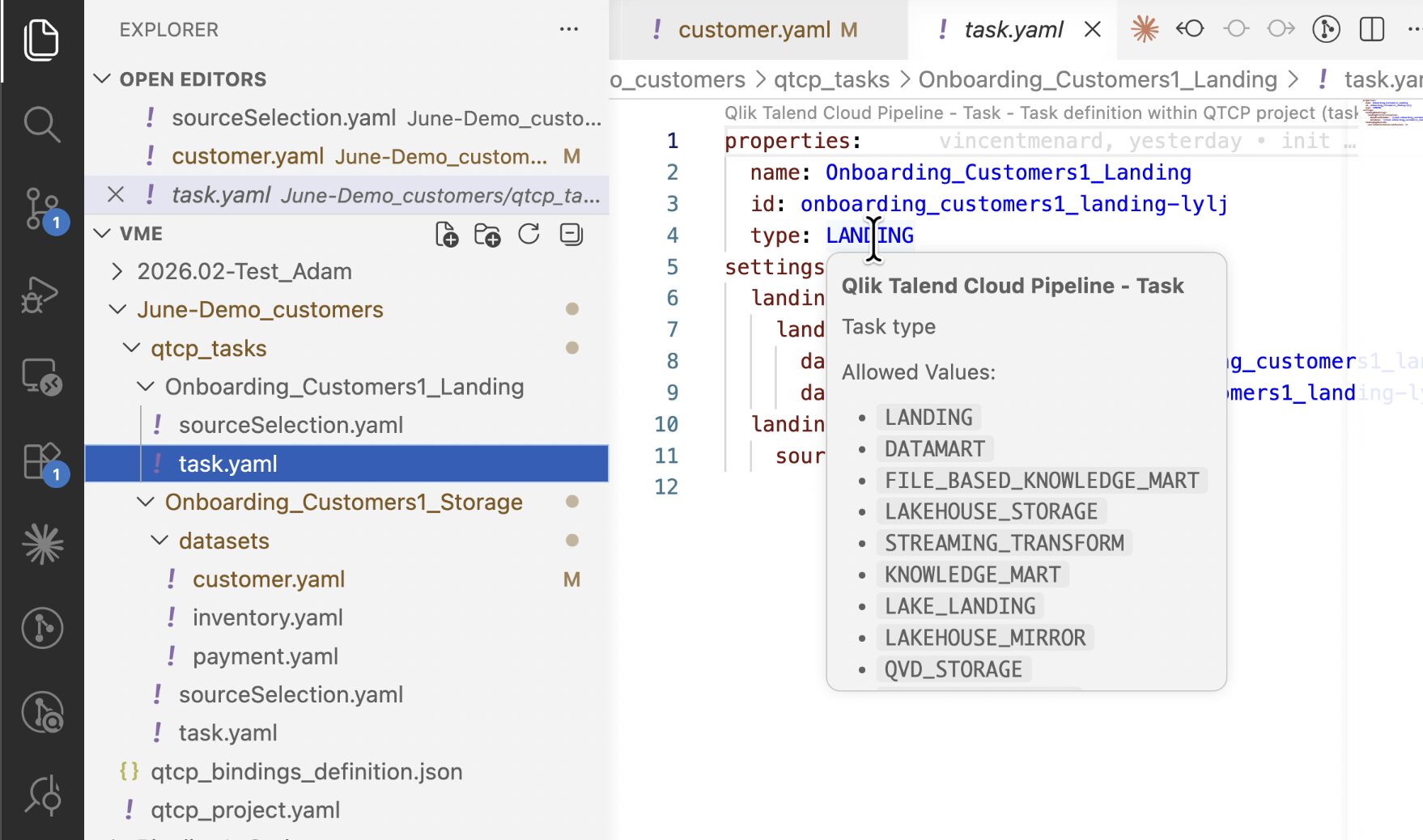
Declarative pipelines are now generally available in Qlik Talend Cloud Pipelines, introducing a new way to define and configure pipelines using YAML.
Published schemas provide inline property documentation, auto-complete, and real-time validation directly in the editor. For teams using VS Code, those schemas can be retrieved automatically, making the authoring experience much smoother from the outset.
The feature also fits neatly with GitHub-based workflows, allowing teams to work in a more GitOps-style way with peer review, version control, and more consistent promotion across environments.
To support this new approach, Qlik has introduced a new validation endpoint:
POST /api/v1/di-projects/utils/actions/validate-project-definitions
This acts as a dry-run check for YAML project structure before the project is imported into a tenant.
A new import endpoint is also available for YAML-based ZIP packages:
POST /v1/di-projects/{projectId}/actions/import-async
Qlik is also leaning into AI-assisted development here. Using tools such as Claude Code, GitHub Copilot, or another coding agent of your choice, teams can use the published schemas and bundled instructions to generate schema-valid YAML and speed up pipeline authoring.
The legacy JSON format remains supported until the end of June 2027, giving customers time to plan and manage the transition.
More information: Declarative pipelines
3. Qlik Replicate customers: Your path to Qlik Open Lakehouse starts here
Qlik Open Lakehouse now supports Qlik Replicate as a native source, creating a straightforward path from existing Replicate deployments into an Iceberg-based lakehouse architecture.
If Replicate is already landing CSV files to Amazon S3, Open Lakehouse can read from that bucket directly. From there, the pipeline takes over and handles the rest, including optimised Apache Iceberg tables and optional SCD Type 2 history.
Qlik highlights three main benefits here:
- No changes to your existing Replicate deployment
If you are already landing data to S3, Open Lakehouse can begin consuming it without reworking the Replicate setup. - Lower ingestion cost
Rather than using warehouse-grade compute for ingestion, Open Lakehouse uses lighter-weight spot compute, with Qlik positioning this as a potential reduction of up to 70% in ingestion cost. - Open, interoperable data
Once the data is stored in Iceberg on S3, it can be queried by platforms such as Snowflake, Databricks, Redshift, and Trino, helping reduce platform lock-in.
For existing Replicate customers, this is clearly intended as an easier on-ramp into Qlik Open Lakehouse without needing to start again from scratch.
Onboarding data from Qlik Replicate
4. Run history monitoring is now available in all regions
Run history monitoring has been extended to the eu-central-1 region (Frankfurt), completing rollout across all regions that were previously pending.
At this point, run history is now broadly available, with Israel, Brazil, and France the remaining exceptions. Qlik notes that support for those regions is expected from the second half of June 2026.
5. Attach a business glossary to your data products
Data products can now include an attached business glossary, giving consumers clearer business context alongside the datasets themselves.
Previously, documentation at data product level was limited to free-text descriptions and named owners. With this change, data product managers can link a full glossary directly to the product, helping users understand not only what data is included, but what that data means in business terms.
The value here is straightforward: shared definitions improve clarity, reduce misinterpretation, and strengthen governance by embedding business context directly into the data product.
Summary
June 2026 was headlined by Qlik’s move to make agentic data engineering generally available across both Qlik Talend Cloud and Qlik Cloud Analytics — a significant step in closing the gap between AI ambition and governed, trustworthy data, and significant enough that we’ve broken from our usual format to give it its own section this month.
Alongside that, Qlik Answers continued to mature rapidly, gaining review tooling, file summarisation, and the ability to trigger automations from agentic insights. Qlik Predict also became more accessible via natural language.
Taken together, July’s updates show Qlik continuing to invest in both modern data engineering patterns and the everyday realities of operating governed pipelines. Declarative pipelines and the Agentic Data Engineering launch point toward a more AI-assisted future, while Open Lakehouse, run history, and glossary support all strengthen the foundations around interoperability, visibility, and business context.
A good month, in other words, for both ambition and housekeeping.
SUBSCRIBE
Want to stay up to date with the latest features that are released in Qlik Cloud?
Subscribe to our blog and get monthly updates directly to your inbox.
WANT TO KNOW MORE? CONTACT US!
Roger Gray
BI Manager
roger.gray@climberbi.co.uk
+44 203 858 0668
Tom Cotterill
Senior BI Consultant
tom.cotterill@climberbi.co.uk
+44 203 858 0668
News archive
Your Data’s in the Cloud – But Are Your Reports Still Manual?
Join us on 20th October to see how automated reporting can work alongside Qlik Cloud to make information delivery more efficient, consistent, and scalable with Mail & Deploy.
>> Register now
Who Can Access Your Qlik Analytics?
By bringing analytics and BI applications together through a single, branded front door, Fusion makes it easier for users to access relevant insights. Join our webinar on 13th October for a live demonstration.
>> Register now
What’s New in Qlik Cloud – September 2026
This month brings a new input option for Write Table, improved global search function, smarter data stewardship, and a simpler way to move semantic types between environments.
>> Read more